Your pet's home screen
What this is for
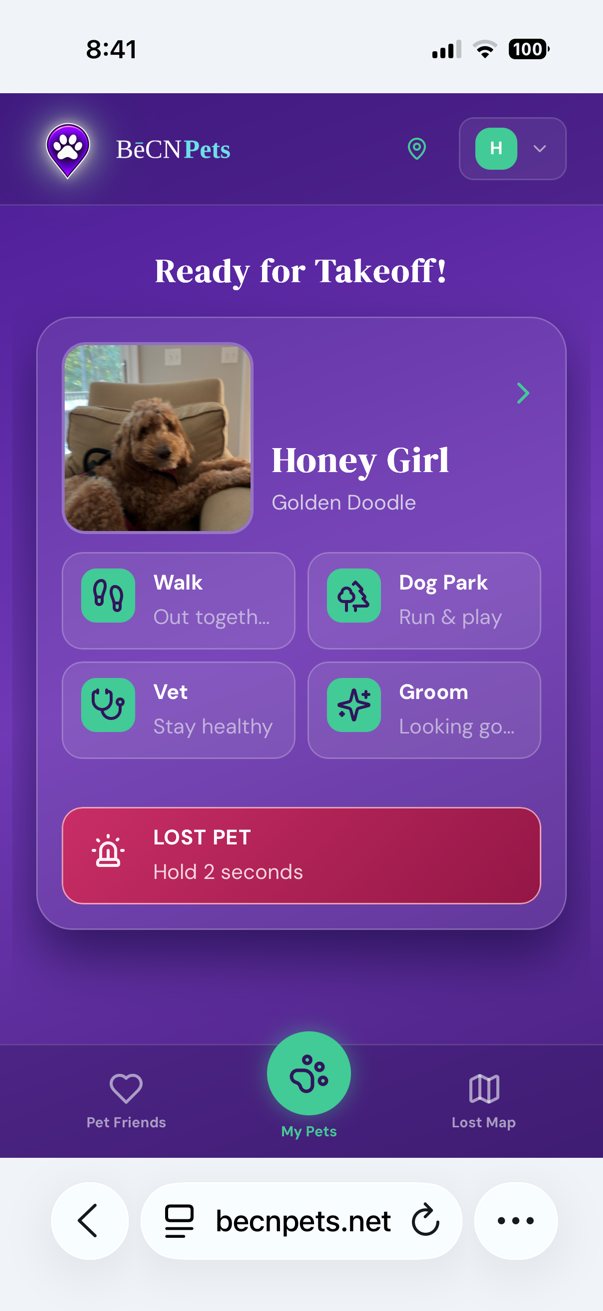
This is the screen you see every time you open BēCN Pets. It shows your pet and the four things you are most likely to need.
What you can do here
Walk, Dog Park, Vet, Groom — tap any of these to log where you have been. These build your pet's activity record automatically, so you never have to remember to write it down.
LOST PET — this is the red button. Press and hold it to tell us your pet is missing. You will be asked to confirm, so you cannot trigger it by accident.
Your pet's photo — tap it to open the full Passport.
Pet Friends — the people you have invited to your pet's care circle.
Lost Map — pets reported missing near you.
About the "press and hold" buttons. Several buttons in BēCN Pets work by pressing and holding for two seconds, not by tapping. This is deliberate — it prevents accidental taps on actions that matter. You will see it on LOST PET, on Found — hold 2s, and on Pet Reunited — hold 2s. If a button seems not to respond, try holding it instead of tapping.
Related pages
Still need help? Email support@becnpets.com or visit becnpets.com/support. We're a small team and we're glad to help.
Most questions are answered in the frequently asked questions.